Tuesday, April 28, 2009

HOW TO: Retweet on Twitter


Sent to you by Hemi via Google Reader:


via Mashable! by Ben Parr on 4/16/09

Twitter LogoRetweeting is an integral part of the Twitter experience. The retweet (or "RT") allows Twitter users to share the best links, tweets, and gems they find from others using the service. But for beginners, it's not immediately obvious what retweets are, or what tools to use to make retweeting easier.

This HOW TO article not only covers the basics of retweeting, but also highlights some of the best web and mobile-based tools for retweeting and tracking RTs in real-time. If you're a Twitter beginner, we hope you find it useful; if you're a more advanced user, we hope you'll share it with friends who are just starting out.


1. What is Retweeting and How to Retweet


Mashable Retweet Image

Retweeting is how Twitter users share interesting tweets from the people they are following. They copy and paste the original tweet and send it out. To give credit to the original person, users usually put "RT" plus the originator's username at the beginning of the tweet. Here's an example:

- The Twitter user @benparr tweets: I just heard that Apple is releasing new iPods in July!

- You retweet by posting RT @benparr I just heard that Apple is releasing new iPods in July!


2. How to Track Retweets


Tweetmeme Image

Once you've gotten used to retweeting and seen some excellent retweets in your Twitter stream, you may want to track retweets on a larger scale. The most popular retweets tend to reflect the favorite articles and most important stories of the entire Twitter community. This can be great if you want to find important articles, read useful blog posts, or are looking to track emerging trends.

Here are some of the best web-based tools for tracking retweets:

Retweetradar: Retweetradar [@retweetradar] is a web tool for tracking the most retweeted and trending content on Twitter. It provides a tag cloud to see the most popular content from today, yesterday, and even what's popular right now.

Retweetist: Retweetist [@retweetist] is a tool that tracks the most popular links being retweeted on Twitter, just like Tweetmeme. Retweetist doesn't stop there, however - it also lists the most retweeted accounts on Twitter.

Tweetmeme: Tweetmeme [@tweetmeme] is an authority when it comes to retweeted URLs and stories. Tweetmeme tracks the most popular links on Twitter. Once a link receives enough retweets, it appears on the front page of Tweetmeme. Tweetmeme can also be broken down by categories (i.e. sports, entertainment, technology).


3. Tracking Retweets with Mobile Phones


Retweet iPhone Image

One of the coolest aspects of Twitter is that it's easy to use on-the-go. Tweets can be sent from any mobile phone via text, the mobile web, or iPhone and smartphone applications.

If you need to track retweets while on the move, here are some of the best mobile tools for tracking retweets:

Retweet iPhone App [iTunes link]: The Retweet iPhone app, which we recently reviewed, is a great app for tracking the most popular retweeted URLs on Twitter. It costs $0.99.

Tweetmeme Mobile: If you're not an iPhone owner, you're in luck - Tweetmeme has a mobile version at m.tweetmeme.com. Bookmark it so you can see the most popular retweets from anywhere!

TweetieTweetie reviewsTweetie reviews [iTunes Link]: The most popular Twitter iPhone App includes a section for viewing top Twitter trends and searching for retweets.


4. How to Retweet with just Two Clicks


Another cool aspect about Twitter are the great applications people build to make using Twitter easy. There are desktop and web applications that can show you all of your Twitter friends and tweets in one place.

The coolest part? Some of these applications make retweeting as simple as two clicks: one to create the retweet, and one to post it to Twitter. No copy and paste required! Here are some of the best applications for two-click retweeting:


Tweetdeck retweet image

Tweetdeck: Tweetdeck is a very popular application for running Twitter on your desktop. It has many features, but one of its best is its one-click retweeting feature - hovering over a profile picture provides the easy option for retweeting anyone's tweets - just click the bottom left icon.


Seesmic Desktop: Seesmic Desktop is another great desktop application for Twitter. Formerly known as Twhirl, it also helps users read, reply, and send tweets from the desktop. Just hover over the profile picture and click the bottom-left bottom to retweet any post.


Tweetree Retweet Image

Tweetree: Tweetree is a web-based Twitter application that helps organize Twitter using conversation trees, so you can see an entire Twitter conversation on one page. Tweetree has an easy-to-use retweet feature at the right hand side of any tweet. TwitZap is another web-based Twitter application that has a similar one-click retweet feature.


5. Mashable's Best Retweeting Resources


If you're looking to continue your education in the art of retweeting, then we encourage you to read some of our most popular Twitter and retweeting posts:

- The Science of ReTweets: Dan Zarrella explains which factors make certain tweets more viral than others.

- Retweet iPhone App for Twitter - Our review of the Retweet iPhone App.

- 15 Fascinating Ways to Track Twitter Trends - Covers some of the best tools for tracking trends on Twitter.

- Please Retweet Me Makes Retweeting Dead Simple - Our review of a site that helps people retweet posts.

Tags: retweet, twitter


Things you can do from here:


Caption Editor for YouTube Videos


Sent to you by Hemi via Google Reader:


via Google Operating System by Alex Chitu on 4/16/09

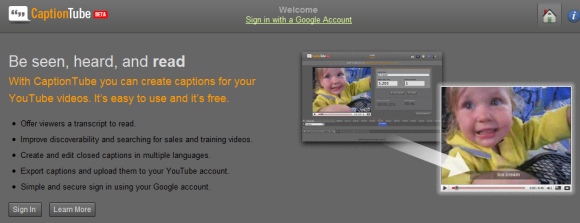
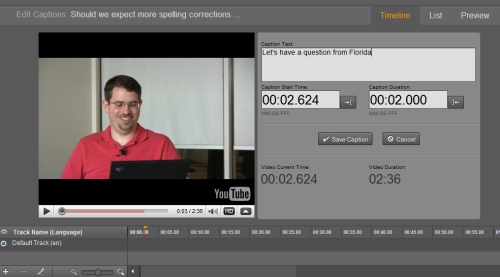
CaptionTube is a site that lets create captions for YouTube videos. For example, you can include a transcript of the video in one or more languages and YouTube's search engine will bring more viewers.

The site lets you caption any YouTube video, not just the ones that you've uploaded, and the captions can be exported as an XML file that will be later imported at YouTube.


YouTube's blog mentions that the site has been built by John Skidgel, a user experience designer that works at Google. Another online captioning service created for YouTube is YouTube subtitler, but it's less user-friendly.

PLYMedia's research showed that subtitles increase the amount of time that users spend watching videos by about 40%. "As more and more online video is consumed in an increasing variety of settings—from office environments to noisy bars to mobile phones—it makes sense to add closed-captioning and subtitling features to digital video files. These enhancements expand opportunities for viewers to enjoy online video, even when it's impractical for them to have the sound turned on."


Things you can do from here:


Battlefield Heroes Beta - Free Cartoon Shooter Game


Sent to you by Hemi via Google Reader:


via MakeUseOf.com by Simon Slangen on 4/16/09

We know Battlefield from other games of the franchise; Battlefield 1942, Vietnam, Battlefield 2, and so on.

Most shooter fans know these games by name, and have played at least one, and possibly even several of them. The Battlefield games have always been popular, and enjoyed by masses, but the latest game, Battlefield Heroes, heads in another direction.

Not only does DICE abandon the more serious looks of the franchise with a more comical approach, this latest instalment of the series is the very first one to be released for free. It now seems that even the bigger players are starting to play around with the possibilities of the free, ad-supported world.

The game is still in Beta, but has recently begun accepting applications. View how to obtain your beta-key here. Read on to discover more about the game.

Battlefield Heroes

It becomes apparent quickly that DICE means business differently this time, with the game adapting a brand new look. The comical visuals differ widely from the high realism we know from the past. The looks manage to bring a much lighter air about the game, making an easier match for the less powerful systems, and creating a loose and at times 'funny' experience.

Factions

In this multiplayer First Person Shooter, you look through the eyes of a Hero, belonging to either the Royal, or the National Army. Though not in letter, the factions can't help to resemble the Allies and Axis of World War II.

You can create up to four different heroes, with different factions, classes and appearances. Mind your choice though, as deleting heroes is not possible for the time being.

Classes

There are three available classes, the same three for both factions;  Soldier, Gunner and Commando.

Which of these classes you choose depends on your way of playing. As I said before, you can create four different heroes, so you can go for a test drive with each one.

The Soldier is the most basic character type. He has an average strength and inflicts damage with rifles, SMGs, shotguns or grenades.

The Gunner is of a heavier class. He is stronger, but also slower. He resorts to weapons of the biggest caliber, like machine guns or bazookas.

The Commando is the sneaky bastard. He becomes invisible and sneaks up to the enemy. His attacks are much more weighed and very specific, often stalking and kniving opponents. He must strike at once, or lose his advantage.

Gameplay

The Game automatically pairs you with an available game, suiting your current skills. Alternatively, you can also join a friend if you know his username.

The game revolves around one major play type, node capturing. Several nodes are spread over the map. By entering and remaining in the near vicinity of the a node's flag, you can both disown an enemy's area, and name it your own. The ultimate objective is to hold all nodes in your team's possession.

There are several maps, aimed primarily at vehicle or infantry battles, or both. This aim largely determines the rest of the map as well. As you can imagine, a map with planes will be much bigger than one with nothing but infantry.

Missions and Abilities

Missions spices up your gameplay, and can gain you Hero Points or Valor Points (more on the latter one below). These missions are specific achievements, like reaching a certain number of kills in one play, and can be activated three at a time.

Using your Hero Points, you can obtain and upgrade certain Abilities. These range from healing yourself to blasting back all nearby enemies and vehicles with a makeshift forcefield. Training these abilities makes you stronger in battle, and allows you to take part in the harder games.

Valor Points, Battle Funds and The Store

Valor Points and Battle Funds are both currencies used in the game's store. The difference lies in how they're obtained and where they can be spent.

Valor Points (VP) are obtained while playing the game and can buy you new and advanced weaponry, emotes and widgets.

Battle Funds (BF) are bought with your credit card. They're not a necessity, but you'll need them to buy clothing, and certain emotes and widgets.

In Short

In short, Battlefield Heroes is a new, comical instalment of the popular Battlefield series. The game entertains you with its comical looks and the node capturing gameplay. Fun to play, hard to let go. Get your beta key now!. Normally, beta keys are handed out within a day or two so you don't have long to wait.

What do you think of the game? A change for the good or one leg in the grave? Tell us in the comments.

Enjoyed the article? Please leave a comment and tell us what you think about it.

New on MakeUseOf …

Categorized under: , , , , ,

Related posts


Things you can do from here:


JotForm: Easy Form Creation Tool


Sent to you by Hemi via Google Reader:


via MakeUseOf.com by azim on 4/14/09

JotForm is an easy yet versatile online form creation tool that lets you build forms in a snap without registration. You can use it to create basic forms (contact form, satisfaction survey etc.) as well as advanced forms (job application, reservation form).

Start creating your form immediately on the site by modifying the existing template or create a new form from scratch using step-by-step Form Wizard. When you are done, click to preview your form online and get the source code to include into your webpages.

easy form creation

Create simple forms to collect basic information (name, email, address ) or build more advanced forms that include payment information, captcha codes, birth date pickers, file uploads and more.

Register on the site to save and edit forms later and share them on the web,

Features:

  • Easy to use web form builder.
  • Lets you build simple and advanced forms online without registration.
  • Create a form by modifying  the existing template or create form from scratch using step-by-step Form Wizard.
  • Add different type of fields - textboxes, text areas, drop down menus, file uploads, radio buttons, check boxes and more.
  • Edit properties for each field - label, size, description etc.
  • Option to preview the form online.
  • Forms are integrated to accept payments by PayPal, Google Checkout, 2Checkout and other payment systems.
  • Register to save, edit and share forms on the web.
  • Free account has a limit of 100 submission per month and 10 MB max file upload. Premium account with more options available.
  • Similar website: Wufoo, phpForm and Doculicious.

Check out JotForm @ www.jotform.com

New on MakeUseOf ...

Categorized under: ,

Related posts


Things you can do from here:


SimpleCountryCodes: Find out International Calling Codes


Sent to you by Hemi via Google Reader:


via MakeUseOf.com by kaly on 4/14/09

If you ever need to look up international dialing code to some country go to SimpleCountryCodes.com. On this simple website you can quickly find international dialing codes to pretty much any point on the globe. Once you enter your location and the country where you want to call the SimpleCountryCodes will give you the code.

find international calling codes

  • International dialing codes lookup.
  • Simple and clutter free interface.
  • Similar website: Tp2Location.

Check out SimpleCountryCodes @ www.simplecountrycodes.com (via Redferret)

New on MakeUseOf ...

Categorized under: ,

Related posts


Things you can do from here: